I was setting up krita on my tablet and I was trying to import brushes with the abr file type but krita doesn’t show anything for the brushes? Am I missing something?
 Hello @Malakai_Morrison, and welcome to the forum!
Very probably you are overlooking something. An ABR file can be imported into Krita, but without using one or two experimental plugins, you can only use the brush tips contained in the ABR files. And even using these plugins, the result of the conversion of ABR brush presets into Krita’s KPP format is in no way perfect and needs a lot of adjustments and understanding of the brush engines Krita uses.
This means that you cannot use an ABR in Krita in the same way as in Photoshop.
But okay, you asked for importing ABR’s (Adobe Brush Resource archives) into Krita, and that should simply work in the same way as it works on Krita’s desktop versions. Since ABR’s are a special kind of bundle for Krita, you can import them as such:
A bundle is installed in Krita via the menu ‘‘Settings’’ >> ‘‘Manage Resource Libraries…’’ and in the opening dialog you have to click the button + Import in the next dialog browse to the downloaded bundle, select it and confirm the selection. Now Krita imports that bundle, and you can use its content, so the brushes in case of this bundle.
In case this BUNDLE comes in an archive-file, like ZIP or RAR for instance, then you have to unpack the archive to get the BUNDLE-File it contains, then you can proceed as described above.
In case of further questions, feel free to ask. And if you are in search of brushes for Krita, why don’t you take a look in our Resource Category for Bundles and Brushes:
In between, there exists a huge number of brushes for Krita, I alone own over 12k different brushes for Krita.
Michelist
I’ve gotten them in the resource manager but nothing is showing up at from the pack
The file in question MB_Starter_Pack_V8.abr from cubebrush.co
That is because that ABR was made with a Photoshop version above CS6. To make it usable as brush tips in Krita, you need to convert it first using a program called abrMate. Then, after importing that converted ABR you can see its brush tips in Krita’s brush editor, in the brush tips tab or alternatively in the Manage Resources... dialog of Krita that you reach via Settings > Manage Resources..., there you need to select Brush Tips in the first drop-down menu and in the second drop-down menu you have to select the imported ABR file you converted before, it will usually be the last file in that list, if you did not import other bundles, ABRs, or ASLs in between.
The brush tips you will get from the converted bundle are these:
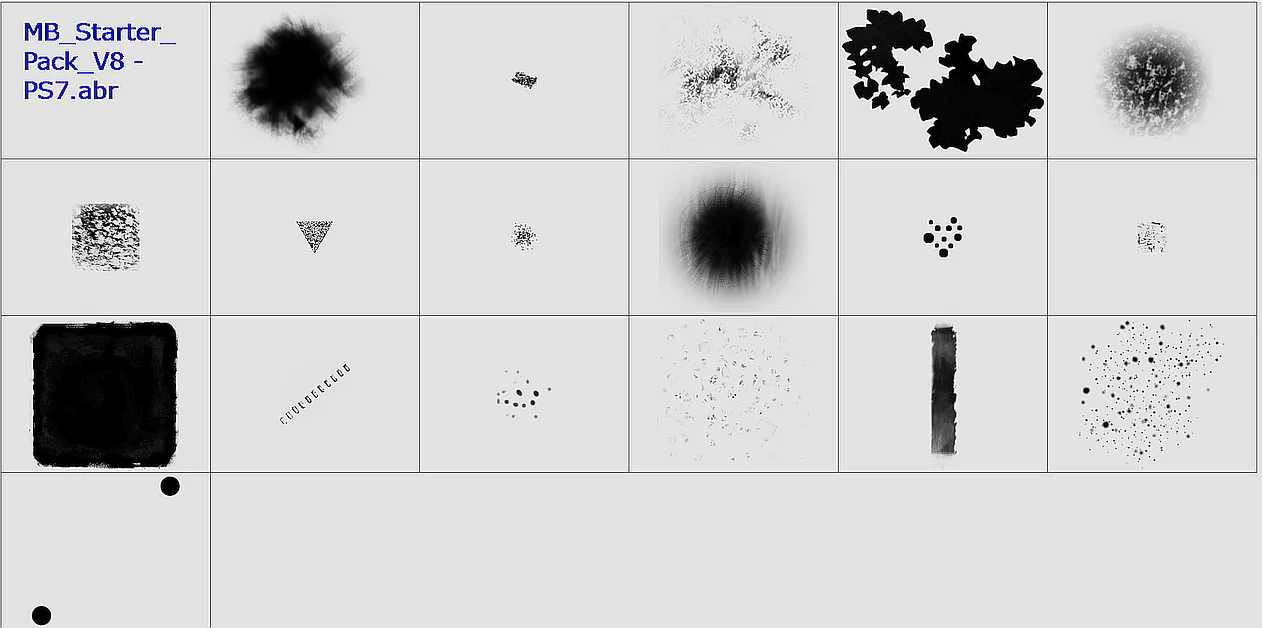
You will find them in the locations I described above. To make brushes of them you need tons of work. It would be far easier to use Krita’s own brushes, they are made for Krita and optimized for Krita.
But with these brush set from MB you have a little luck in which I’m involved a lot, there exists exactly this MB brush pack ready converted, set up and tested for Krita here in the forum. In that topic which originally was created from @sadinwilfbin who initially converted that set from PS to Krita, and because MB repeatedly exchanges the ABRs at cubebrush.co with updated versions, @sadinwilfbin’s version no longer worked because the updated versions mix the ranks of the contained brush tips. If you want to know what I have to with that bundle, you have to read up the whole story here:
If you download the bundle from there or use my link below is up to you, the content is identical:
And there exists another bundle for Krita that is based upon PS brushes, it is Odzuki’s stroke of genious about which the topic is found here (the download-link offered by Odzuki is defunct, I was asked to take over the further hosting of it):
Links to download the bundle are found in the second posting or here:
If you want to try your luck with the experimental scripts to convert PS ABRs to Krita KPPs or BUNDLES is up to you, here you find their topics:
All-in-All it is a bad idea trying to convert ABRs for the use in Krita. You have to invest a huge amount of time and work to make them behave similar.
It is like converting the windshield wipers of one car to those of a different manufacturer click-on system, it will work somehow, but they are not made for another car and achieve suboptimal results.
Michelist
Ok thank you so much for taking the time to help with this
Be sure to mark your question “solved” so helpers will know they don’t need to open and read the topic.