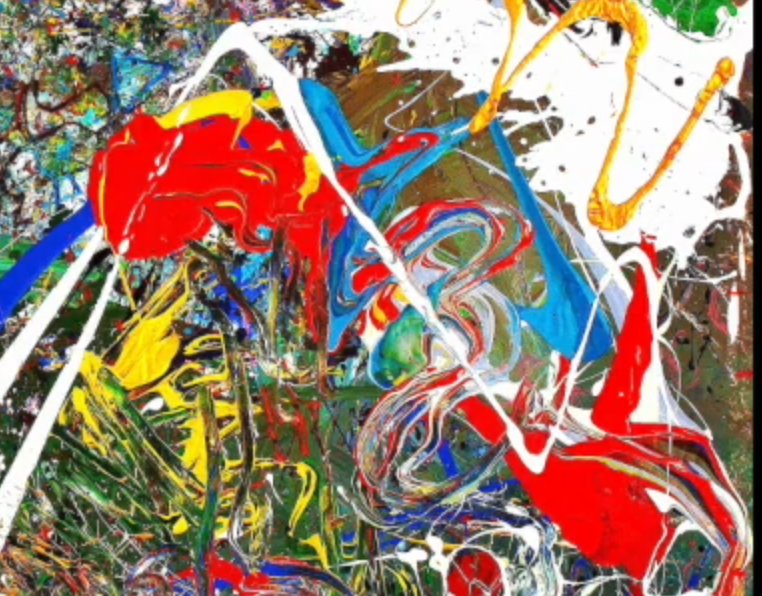
Is there a way to get brush strokes like in this picture example? Especially the red paint where you have the vet paint. Witch show’s that there is more material - paint - under the stroke.
Hmm.
I feel so far RGBA brushes are the best available organic option for thick painting in Krita .
Maybe in final Krita 5 version, the improved smugde and brush tools will behave more like real impasto painting.
Probably something like Thick/impasto painting in Artrage .
The following brush sets may be worth a look.
For example, the Impasto presets of the “wont teach you to draw brushpack v6.0” by wojtryb, as well as the bundle “Experimental Oils for Krita” by IForce73, the preset “muses 04 03 Oil brush large copy” from the Muses bundle by Ramon Miranda found here has very interesting wiping effects on already existing paint application of other brushes (it is a wiping brush without its own color! ), the “RZV Krita BrushKit” (only available as a very slow download via archive[dot]org) has three possibly useful brush presets, especially the preset “i) Oil Brush Sculpt RZV” I personally find interesting.
Then the preset “GDquest OilPaint” from the “GDquest_lite_v7 Bundle” looks interesting, in the “Krita brushpack (updated)” by “radian1” I like the effect possibilities of the presets “R S Oils High Load”, “R S Oils Low Load”, “R S Oils No Load”, “R S Sculpt”. All these are free of charge. A very interesting Bundle is Digital Atelier, also by Ramon Miranda, you can find it in the Krita shop. That would be it for now
Michelist
Edit: removed a translation error I hadn’t noticed
QMichelist <<< Thank you! I will investigate your - lot off - information. And will come back after been working out the links your gave and see what it brought me.
Use RGBA brushes and this new smudge brush RGBA Smudge brushes
Ah I also used some brushes that I created but they will not be available if not until the exit of Krita 5
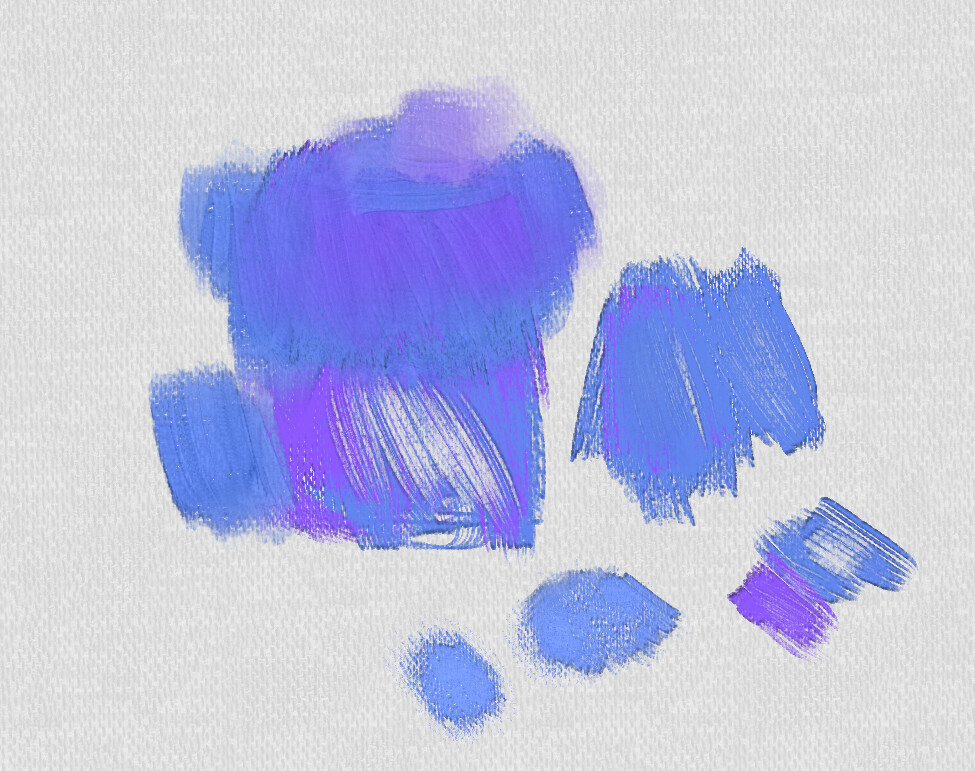
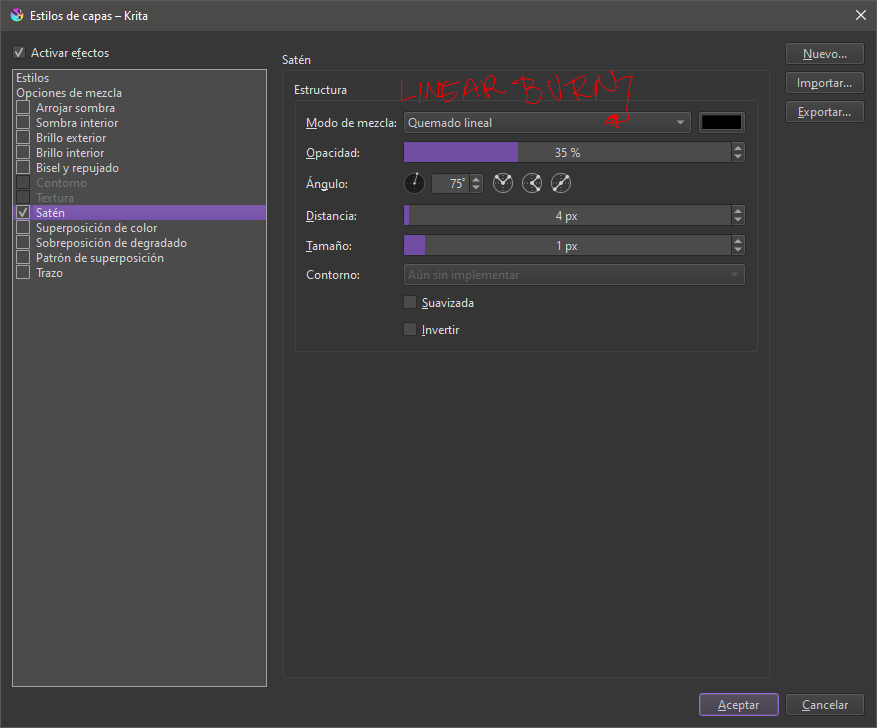
To give a “liquid” effect to the painting I used a layer style, the effect was satin specifically.
I’ve been doing lots of experiments with RGBA brushes the past few months, so hopefully I’ll have some worth sharing by the time Krita 5 launches. I’ve produced some nice deep textural effects using real captured dabs. I think Ramon may also be working on some new ones.
The layered effect is still valid, and can even be used in combination with RGBA brushes if you’re careful with the settings. One advantage of the layered effect is you can set the direction of the lighting, and make changes later as it’s not baked into the paint layer. In most instances though, the brushes would be my preference.
Till now I am working my way around with the RGBA Brushes they are the most capable to produce some “effect” of organic oil paint. In the same time going on true all the information given under this topic.
I am still not impressed with the results. Only the first two of the “RGBA Brushes” i see as a option for future development. They are acceptable starting point with “Satin Layer” information given by @ SchrodingerCat
My experience so far is that most brushes, have the effect of paintbrush spay.
Another important point is the structure information, from the background, meaning the canvas but during painting the under layer paint. The brush should react on the dynamic of the under paint, meaning the structure of the paint, if you go over it the brush will dynamically/randomly react in how it will drop paint, e.t.c.
As @Ari mentioned > probably something like Thick/impasto painting in Artrage .
I installed Artrage ( Wine) and yes that’s comes close to how organic paint works on the canvas. And I was quickly able to get the results as seen in the images of real organic impasto painting example, I started my question with here.
As this brush passes over existing color on the canvas, can it “pick up” the color, like wet on wet paint on a traditional canvas? If not yet, that feature will be greatly anticipated
that some paint is picked up and mixes like real oil paint
if we could sample the color information right from the canvas - that would make a true traditional painting approach possible
@Mythmaker Thank you for your service and helping me on my way into Krita. And I am looking forward for your brushes in Krita 5.
When it comes to oil painting, the paint engine should have the need of a more random unpredictable aspects in it’s algorithm. To get a more unpredictable stroke, witch is the case in real painting, and you as a painter will or has to react on that. Now as every stroke looks similar, the outcomes is monotone.
Paul Nasca the original programmer of the ZynaddSubbFx Synth, told in a interview what makes his synth sounds so natural. His algorithm of generate wave tables include random algorithm. That makes that we hear it as natural sounds.
Paul Nasca contributed to a lot of opensource project, one of his algorithm, the “LDR Tonemapping” is include in digiKam as “Local Contrast”. We could ask Paul for advice in order to create a more natural acting paint engine in Krita.
First off all Michelist thanks for bringing in that many information, witch helped me to get in touch of oil painting possibilities in Krita. I will order the Digital Atelier from Ramon Miranda in the Krita shop, in order to get more understanding of how brushes are made, e.t.c.
I think what you ideally want is physics emulation, but Krita isn’t designed that way; it’s a broad use painting application.
There are several different brush engines, and a huge amount of variables to combine; that enables the creation of things that don’t seem possible on the surface - you can see a couple of examples I demoed in this thread.
Because Krita isn’t physics based, when we create natural looking brushes we have limited scope for emulating behaviour, but can often achieve a convincing look. The watercolour brushes are a good example of this. Dry media such as charcoal are easier to emulate convincingly than more fluid media types.
We don’t currently have a colour pickup/dirty-brush option available, but I think that is being worked on by @Voronwe13. That will work by combining the clone brush with the existing engines i.e. pixel and colour-smudge.
Your best bet for dragging colour on the canvas currently is either the smear setting in the colour smudge engine, or using the clone-brush (as I did in the still-life fizzyflower linked to above). You could bake specular highlights into an RGBA brushtip, or use a lighting layer-effect.
I’m not sure displacement is currently possible - it might be with a g’mic filter, but I haven’t managed to do it myself.
@Mythmaker Yes idealy it would be great to have a physics emulation. Good that you explained that Krita is not designed that way. That make me understand what to expect.
To understand what is possible and not , I will inform myself into existing brush and paint engines.
Your best bet for dragging colour on the canvas currently is either the smear setting in the colour smudge engine, or using the clone-brush (as I did in the still-life fizzyflower linked to above). You could bake specular highlights into an RGBA brushtip, or use a lighting layer-effect.
Your best bet for dragging colour on the canvas currently is either the smear setting in the colour smudge engine, or using the clone-brush (as I did in the still-life fizzyflower linked to above). You could bake specular highlights into an RGBA brushtip, or use a lighting layer-effect.
 .
.